"Verified: No" for NES hashes

Simone D. Alemanno

Legend
Verified Member
Is it normal that the hashes for NES games have always "Verified: No" in them, unlike most other console hashes after adding them in?

The FDS for whatever reason has those verified, but I don't know why the NES wouldn't have them as such.
 
These are the ROM sets that have been imported into the database used to verify hashes. A ROM is marked as unverified if it is not part of these ROM sets.
1 Sega - Saturn v.2026-05-27 08-54-28 (redump.org)
2 Nintendo - Game Boy Advance v.20260531-074517 (No-Intro)
3 Nintendo - Nintendo Entertainment System (Headered) v.20260617-064757 (No-Intro)
4 Atari - 8-bit Family v.20260614-065043 (No-Intro)
5 Nintendo - Family Computer Disk System (FDS) v.20260611-014209 (No-Intro)
6 Nintendo - Game Boy v.20260615-112845 (No-Intro)
7 Nintendo - Game Boy Color v.20260613-134444 (No-Intro)
8 Nintendo - Nintendo 64 (BigEndian) v.20260609-194259 (No-Intro)
9 Nintendo - Nintendo DS (Decrypted) v.20260617-054944 (No-Intro)
10 Nintendo - Super Nintendo Entertainment System v.20260614-014159 (No-Intro)
11 Sega - Mega Drive - Genesis v.20260617-060303 (No-Intro)
12 Atari - Atari 2600 v.20260529-062921 (No-Intro)
13 Atari - Atari 5200 v.20260412-121350 (No-Intro)
14 Bandai - WonderSwan v.20260525-011654 (No-Intro)
15 Commodore - Commodore 64 (PP) v.20260430-075802 (No-Intro)
16 Nintendo - GameCube - NKit RVZ [zstd-19-128k] v.2024-12-03 18-59-29 ()
17 Nintendo - Game & Watch v.20260512-134245 (No-Intro)
18 Nintendo - Nintendo 64DD v.20260519-220433 (No-Intro)
19 Nintendo - Pokemon Mini v.20260529-125415 (No-Intro)
20 Nintendo - Satellaview v.20260529-131500 (No-Intro)
21 Nintendo - Wii - NKit RVZ [zstd-19-128k] v.2024-12-03 18-59-34 ()
22 Sega - 32X v.20260317-140429 (No-Intro)
23 Sega - Game Gear v.20260527-195329 (No-Intro)
24 Sega - Master System - Mark III v.20260527-203639 (No-Intro)
25 Sega - PICO v.20250220-080006 (No-Intro)
26 Sega - SG-1000 - SC-3000 v.20231205-110448 (No-Intro)
27 Arcade - Namco - Sega - Nintendo - Triforce v.2024-03-27 18-54-01 (redump.org)
28 Microsoft - Xbox 360 v.2026-06-15 03-15-02 (redump.org)
29 Microsoft - Xbox v.2026-06-14 23-43-27 (redump.org)
30 NEC - PC-88 series v.2025-05-19 08-26-21 (redump.org)
31 NEC - PC-98 series v.2026-04-06 22-04-02 (redump.org)
32 NEC - PC Engine CD & TurboGrafx CD v.2026-06-14 14-24-19 (redump.org)
33 NEC - PC-FX & PC-FXGA v.2025-05-14 23-35-09 (redump.org)
34 Nintendo - GameCube v.2026-06-13 18-14-01 (redump.org)
35 Nintendo - Wii v.2026-06-15 03-13-28 (redump.org)
36 Panasonic - 3DO Interactive Multiplayer v.2026-06-09 14-48-47 (redump.org)
37 Philips - CD-i v.2026-05-03 02-47-58 (redump.org)
38 Sega - Dreamcast v.2026-06-14 18-25-41 (redump.org)
39 Sega - Saturn v.2026-06-14 12-36-08 (redump.org)
40 SNK - Neo Geo CD v.2026-05-06 12-21-03 (redump.org)
41 Sony - PlayStation 2 v.2026-06-15 03-41-38 (redump.org)
42 Sony - PlayStation 3 v.2026-06-14 10-20-40 (redump.org)
43 Sony - PlayStation v.2026-06-15 11-55-46 (redump.org)
44 Open2600 v.3.14 (OpenGood)
45 Open5200 v.2.01 (OpenGood)
46 Open7800 v.3.28 (OpenGood)
47 OpenChaF v.3.1415 (OpenGood)
48 OpenCoCo v.3.27 (OpenGood)
49 OpenCol v.3.14 (OpenGood)
50 OpenCPC v.3.1415 (OpenGood)
51 OpenGameBase64 v.3.00 (OpenGood)
52 OpenGBA v.3.27 (OpenGood)
53 OpenGBA.E+ v.3.27 (OpenGood)
54 OpenGBA.GBA v.3.27 (OpenGood)
55 OpenGBA.MB v.3.27 (OpenGood)
56 OpenGBx v.3.14 (OpenGood)
57 OpenGBx.GBC v.3.14 (OpenGood)
58 OpenGBx.GB v.3.14 (OpenGood)
59 OpenGCOM v.3.27 (OpenGood)
60 OpenGen.32X v.3.21 (OpenGood)
61 OpenGen v.3.21 (OpenGood)
62 OpenGen.Gen v.3.21 (OpenGood)
63 OpenGG v.3.20 (OpenGood)
64 OpenINTV v.2.03 (OpenGood)
65 OpenJag v.2.01 (OpenGood)
66 OpenLynx v.2.01 (OpenGood)
67 OpenMO5 v.3.1415 (OpenGood)
68 OpenMSX1 v.0.999.3 BETA (OpenGood)
69 OpenMSX2 v.0.999.3 BETA (OpenGood)
70 OpenMTX v.3.1415 (OpenGood)
71 OpenN64.64DD v.3.27 (OpenGood)
72 OpenN64 v.3.27 (OpenGood)
73 OpenN64.N64 v.3.27 (OpenGood)
74 OpenNES v.3.23b (OpenGood)
75 OpenNGPx v.3.27 (OpenGood)
76 OpenNGPx.NGC v.3.27 (OpenGood)
77 OpenNGPx.NGP v.3.27 (OpenGood)
78 OpenOric v.2.01 (OpenGood)
79 OpenPCE v.1.09a (OpenGood)
80 OpenPico v.3.15 (OpenGood)
81 OpenPSID v.3.22 (OpenGood)
82 OpenSAMC v.2.03 (OpenGood)
83 OpenSMS v.3.20 (OpenGood)
84 OpenSNES.BS v.3.27 (OpenGood)
85 OpenSNES v.3.27 (OpenGood)
86 OpenSNES.SNES v.3.27 (OpenGood)
87 OpenSNES.ST v.3.27 (OpenGood)
88 OpenSPC v.3.22 (OpenGood)
89 OpenSV v.3.27 (OpenGood)
90 OpenVBoy v.3.1415 (OpenGood)
91 OpenVECT v.1.06 (OpenGood)
92 OpenWSx v.3.27 (OpenGood)
93 OpenWSC v.3.27 (OpenGood)
94 OpenWS v.3.27 (OpenGood)
 
I tested it with the only game I have on my PC, and it was recognized. And there are quite a few entries in the hashes.sqlite database for the NES. Maybe I should import a slightly older No-Intro dump.

1786975287055.webp
 
Can you send me the hash information for the ROMs that might be causing problems? That way, I can see which ROM set I need to import or if there's an issue. Thanks.
 
So the info for the SMB ROM looks like this, for example:

Filename: Super Mario Bros. (World).nes
CRC32: 3337ec46
SHA-1: ea343f4e445a9050d4b4fbac2c77d0693b1d0922
Verified: No

And the only WonderSwan entry I have looks far different:

Filename: Digimon Anode Cathode Tamer Veedramon Version.wsc
CRC32: 77689273
SHA-1: 7A6411CF8A4D91E8A4E0532779F11BDD25B92363
Verified: No

Notably, the letters in these hashes are all caps here unlike the NES hashes.

EDIT: And it looks like the entry for the SNES games might be out of date, because when I updated hashes for the Yoshi's Cookie Title Screen hack I made, they came out like this:

Filename: Yoshi no Cookie (Japan).sfc
CRC32: 1e1aa75f
SHA-1: a7261fe214888346129b322012521d80a9d15319
Verified: Nintendo - Super Nintendo Entertainment System v.20260614-014159 (No-Intro)

The name for the ROM is incorrect because it should recognize it as "Yoshi no Cookie (Japan) (En)" regardless of the filename.
 
So, for Super Mario Bros., the hash in the database doesn't match what you sent: 33d23c2f2cfa4c9efec87f7bc1321ce3ce6c89bd

I'll check to see if your hash exists in another NES romset. If not, that means your ROM must have been modified at the source.

As for the Wonderswan hash, it’s a capitalization issue when adding the hash manually; I’ll fix that within the week.
 
This confusion for the NES rom is likely caused by the new header version that was implemented a few years ago. The data that Simone posted is likely the outdated verified version, but those headers haven't been on No-Intro's verified lists for a few years now. The rom data is likely still the same.
 
Due to variation in NES file headers, I think it can be common to have an NES file that will show up as Verified "No" in the ROMHack Plaza hash tool. If you want to get a particular NES file to show up as "verified", you'll need to research the most up-to-date header it should use. (I might explain some ways to do this in another post.)

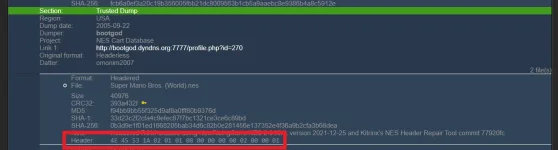
For example, the Super Mario Bros. file you mentioned (file CRC32 3337ec46), has a header of
4E 45 53 1A 02 01 01 00 00 00 00 00 00 00 00 00

But the most correct header is currently considered to be
4E 45 53 1A 02 01 01 08 00 00 00 00 02 00 00 01

Here is what those headers mean according to the header editor in the emulator Mesen:
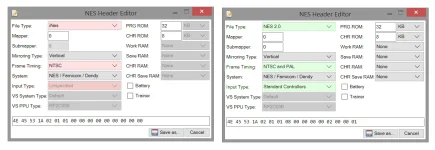
header-changes.webp

If you update your file to have that updated header, then the ROMHack Plaza hash tool will show it as Verified "Nintendo - Nintendo Entertainment System (Headered) v.20260617-064757 (No-Intro)".


More details

When you use the ROMHack Plaza hash tool to check an NES file, it looks like the Verified field will show the name of the database the NES file hash matches up with, for example, "Nintendo - Nintendo Entertainment System (Headered) v.20260617-064757 (No-Intro)". If the NES file hash didn't match up with the database, the Verified field will instead say "No".

The NES file hash will only match up with the database if the NES file header is the same one that the database version uses.

In an NES file, the first 16 bytes are the NES file header. This header is not part of the contents of the ROM chips on the cartridge, it is only extra information for emulators, mainly to describe the type of "mapper" chip the cartridge uses. This kind of header is called an "external" header, because it's only for emulators and doesn't appear in the data of the game itself.

Some older NES files can have incorrect headers. But also, even if an NES file has a correctly working header, opinions about the most correct header to use can change over time.

In particular, the NES file header format has been extended into the backward-compatible "NES 2.0" header format. The NES 2.0 header format adds a "submapper" number that can help distinguish certain mapper variants. It also includes extra information like the most appropriate controllers to use with the game. Older NES files don't have that extra information in their headers. So an older NES file with a non-2.0 header might still be functionally correct or mostly correct, but an up-to-date hash database will use the most up-to-date NES 2.0 header that is considered the most correct today.


Other systems

NES catridges have hundreds of different mapper types, so the external NES file header is important to get the game working in an emulator. Files for other game systems often do not need an external header. (The game contents either has an internal header that is already appropriate, or there are very few mapper types and the emulator can detect the correct one automatically.)

You asked about FDS files, for example. FDS files can optionally have an external header, but the only thing the header contains is the number of disk sides the file contains, which can also be detected without the external header by examining the file size. Since opinions about the correct FDS file header do not change, it is more likely you will have a FDS file hash that matches the one in the database and your FDS file will show up as "verified" in the hash tool.
 
Here is a way to manually research the what NES file header is considered to be the most up-to-date correct header.

1. Use a hash tool that shows the "ROM hash" in addition to the "File hash". (The "ROM hash" is the hash of everything else in the file except the NES file header, so the "ROM hash" remains the same no matter what header is used.) For example, you can get a ROM hash by doing either one of the following:

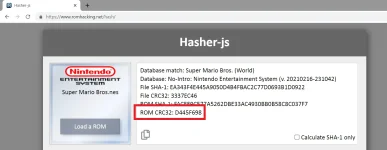
Either A. Go to romhacking.net/hash, drag the NES file into the "Load a ROM" box, then look for the line that says "ROM CRC32:".
1a.webp

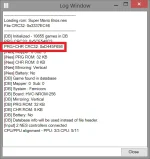
Or B. Open the file in Mesen, go to the Tools menu and choose the command "Log Window", then look for the line that says "PRG+CHR CRC32:".
1b.webp

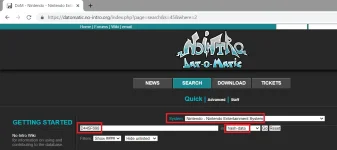
2. Go to no-intro.org and click on Database. For System select "Nintendo - Nintendo Entertainment System". In the search blank, put in the ROM CRC32 value, and in the "in" box select "hash data". Click the "Go" button.
2.webp

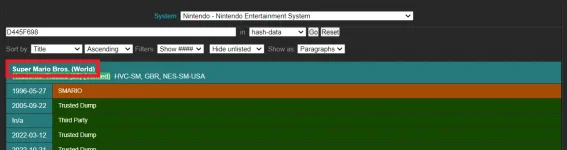
3. In the search results, click on the name of game to bring up the details page:
3-1.webp

On the details page, look for a line that says "Header:"
3-2.webp
 
So, for Super Mario Bros., the hash in the database doesn't match what you sent
If you update your file to have that updated header, then the ROMHack Plaza hash tool will show it as Verified

By the way, I've been thinking about ways the hasher can identify and the patcher can apply patches to an NES file no matter what header it has. But it depends on gathering more hash information. (And ideally, updating existing patch item pages to have additional hash information too.) Mainly, when hashing NES files, add the "ROM hash" (the hash of everything else in the file except the NES file header) and the NES file header to the existing hash information that is gathered. Then update the patcher to change the header before patching if needed.

Benjamin, I wonder if you have thought about any ideas like that? (I've been writing a draft of my ideas. Maybe I might explain my ideas further in another post or thread...)
 
Back
Top