The Romhack Plaza API allows you to retrieve information about entries, news, and metadata to include in your projects.
How do I create an API key?
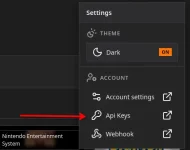
First, you need to have an account on the site. Then, click the “Settings” button in the top bar and select “API Keys.”
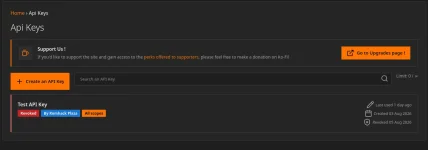
You’ll then be taken to the interface where you can manage your API keys, view when certain keys were last used, check their expiration dates, and revoke them if you wish.
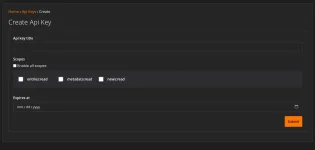
You’ll then see the button to create an API key. You can choose a name, the scopes for this API key, and its expiration date. If you don’t set an expiration date, it will remain valid indefinitely until you revoke it.
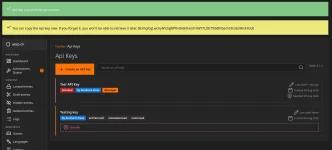
Finally, your API key will appear only once after it’s created, so be sure to copy it right away!
How to Use the API?
All API routes are structured as follows: https://romhackplaza.org/api/v1/<Endpoint>
All endpoints require authentication, which means you’ll need your API key. To do this, you must include your API key in the header as follows:
Name: Authorization
Value: Bearer <API KEY>
The response is in JSON.
All valid API responses will have an ‘ok’ field set to true, and almost all will have a ‘data’ field containing the data detailed in the list of endpoints.
What Are the API Limits?
Once authenticated, the maximum allowed is 30 requests per minute. This is a test value subject to change.
You are also limited to one API key if you have not supported the site. In that case, on the API key management page, you’ll see a message if you want more details about donations.
Any use of multiple accounts to circumvent this limit may result in a permanent ban of your accounts, as well as the removal of all your content from the site.
And for the XenForo API?
Since a significant portion of the site uses XenForo, large projects may need resources on this platform. In that case, you can contact us via the contact form to request an API key if your project meets our criteria.
If you have any questions about the API, please post your questions below the documentation.
How do I create an API key?
First, you need to have an account on the site. Then, click the “Settings” button in the top bar and select “API Keys.”
You’ll then be taken to the interface where you can manage your API keys, view when certain keys were last used, check their expiration dates, and revoke them if you wish.
You’ll then see the button to create an API key. You can choose a name, the scopes for this API key, and its expiration date. If you don’t set an expiration date, it will remain valid indefinitely until you revoke it.
Finally, your API key will appear only once after it’s created, so be sure to copy it right away!
How to Use the API?
All API routes are structured as follows: https://romhackplaza.org/api/v1/<Endpoint>
All endpoints require authentication, which means you’ll need your API key. To do this, you must include your API key in the header as follows:
Name: Authorization
Value: Bearer <API KEY>
The response is in JSON.
All valid API responses will have an ‘ok’ field set to true, and almost all will have a ‘data’ field containing the data detailed in the list of endpoints.
What Are the API Limits?
Once authenticated, the maximum allowed is 30 requests per minute. This is a test value subject to change.
You are also limited to one API key if you have not supported the site. In that case, on the API key management page, you’ll see a message if you want more details about donations.
Any use of multiple accounts to circumvent this limit may result in a permanent ban of your accounts, as well as the removal of all your content from the site.
And for the XenForo API?
Since a significant portion of the site uses XenForo, large projects may need resources on this platform. In that case, you can contact us via the contact form to request an API key if your project meets our criteria.
If you have any questions about the API, please post your questions below the documentation.
- Response
- .